The companion for Claude Code

Supercharge
Claude Code.

cc-viewer runs your normal Claude Code session and wraps it in a real-time web viewer — wire-level request tracing, a browser IDE, multi-agent orchestration, and coding from any device. Everything Claude Code already does, now with X-ray vision. Same claude command; you just type ccv.

$ npm install -g cc-viewer
Built on claude 18 languages MIT licensed npm · Homebrew · Desktop
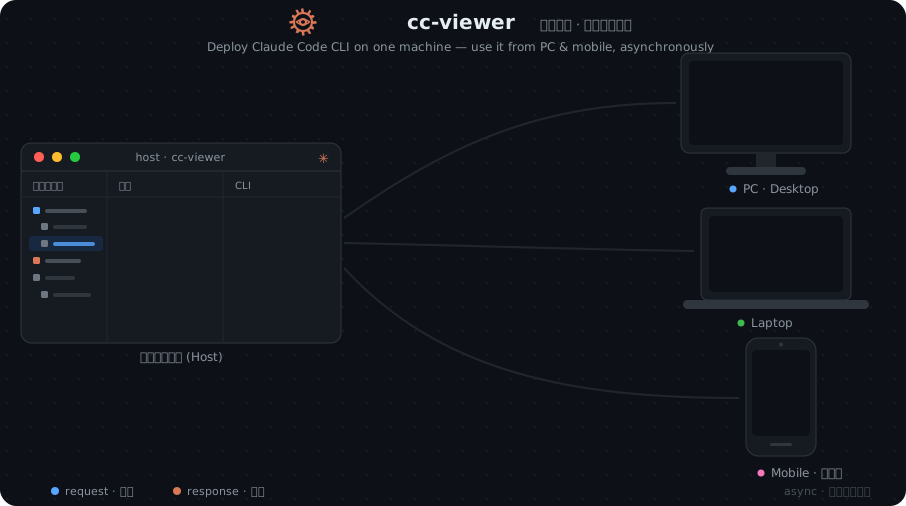
cc-viewer deploys on one machine and streams asynchronous Claude Code sessions to your PC, laptop, and phone

Up and running in seconds

Nothing to relearn

cc-viewer sits on top of your existing Claude Code install and passes every launch flag straight through. Your workflow doesn't change — it just gains a viewer.

1

Install once

npm i -g cc-viewer or brew install cc-viewer. Node 20+ and Claude Code are the only prerequisites.

2

Type ccv

ccv launches Claude Code for you and attaches the viewer. Combine flags freely — ccv -c --d works exactly as you'd expect.

3

The viewer opens

A web UI launches at localhost:7008 — on your machine, your phone, and every device on your LAN.

UltraPlan

Higher Intellectual Ceiling.

Claude UltraPlan · running locally

UltraPlan is a local build of Claude's own UltraPlan-style planning: a panel of specialist experts explores your task in parallel and converges on a plan you approve before anything runs — all inside your own Claude Code session. It reaches results well past the base model, with outstanding, repeatable quality — and none of the overhead of the alternatives.

  • vs Superpower — Superpower bolts on a big, always-on system prompt you pay for on every request. UltraPlan adds power through orchestration, only when you invoke it — no permanent prompt tax.
  • vs UltraCode (dynamic workflow) — open-ended workflows spin up agent graphs that burn tokens on every run. UltraPlan is plan-first: a reviewed plan gates execution, so tokens go to a vetted plan, not exploratory churn.
  • Runs on your machine — the orchestration happens locally in your own session, with outstanding results and nothing shipped to a third-party workflow service.
  • Customizable experts — ships Code Expert and Research Expert templates; edit, reorder, add or hide your own.
  • One toggle — from the terminal toolbar or chat input, whenever a task needs the extra horsepower.
cc-viewer · UltraPlan UltraPlan plan · then execute Code Expert Research Expert +Your expert plan.md reviewed · ready to run token consumption per task · illustrative UltraPlan lean Superpower UltraCode (dynamic workflow)
UltraPlan ✦ Superpower UltraCode (dynamic workflow)
Execution performance Excellent Excellent Good (but unstable)
Execution duration 30 min–2 h 1 h–3 h 1 h–3 h
Suitable scenarios Complex medium-to-long-range tasks Complex extra-long-range tasks Simple, repetitive, heavy-duty tasks
Token consumption Medium High Ultra-high
Context pollution Low High Low
A full IDE, in your browser

Read, diff, search and edit — without leaving the page

Watching Claude work shouldn't mean tabbing away to your editor. cc-viewer brings a VS Code-style workbench right next to the conversation.

  • File explorer & live diffs — every edit rendered as a syntax-highlighted diff, the moment it lands.
  • Search across files — ripgrep-fast, regex, whole-word, include/exclude globs, click to jump.
  • Replace across files — inline before/after preview, capture-group substitution, atomic writes.
  • Embedded terminal — a real PTY with a WebGL renderer, driven from the same window.
  • Git changes at a glance — the working-tree diff, always one click away.
cc-viewer · Search across files reportSwallowed Aa .* 7 results · via ripgrep ▾ src/utils/errorReport.js export function reportSwallowed ▾ src/AppBase.jsx reportSwallowed('stream-progress' ▾ src/components/chat/ChatView.jsx reportSwallowed('ws.terminal' AppBase.jsx · line 214 214 } catch (e) { reportSwallowed('load_chunk', e) }
Work from anywhere

Your phone. Your team chat. Same Claude Code.

Run Claude Code on the machine with your repo, then reach it from wherever you are — a touch-first mobile UI over your network, or straight from the chat apps your team already lives in.

  • Real mobile coding — scan a QR code for a touch-first UI built for the phone, not a cramped fallback.
  • Drive it from IM — DingTalk, Discord, WeChat and Lark integrations relay Claude to your team's chat, with word-by-word streaming AI cards.
  • Async multi-device sessions — PC, laptop and phone stay in sync over SSE, or run independently.
  • Password protection — shareable LAN login with per-project or global passwords; the host machine stays admin.
  • Reverse-proxy ready — one relative-path build deploys at the root or behind a sub-path prefix.
cc-viewer · work from anywhere mobile DingTalk Discord WeChat Lark Claude Code on your machine live · one session one host · every device and chat app you already use
Wire-level observability

Every request. Every response. Captured on the wire.

cc-viewer patches fetch() so it sees the raw API traffic — not a trimmed transcript. The full system prompt, every tool schema, the complete SSE stream. Nothing is hidden.

  • Raw payloads, not censored logs — the exact bytes Claude Code sent and received.
  • Main & Sub-Agent labeling — auto-tagged, with Plan / Search / Bash subtypes.
  • Body-diff view — see only what changed vs. the previous request.
  • Live token & cache stats — input, output, cache write/read and hit rate, per request.
  • Context decomposition — tools, system prompt, and messages broken apart, turn by turn.
cc-viewer intercepts every request and response, tees one copy to the API and archives one, then decomposes the packet into tools, system prompt, and messages

Orchestrate a team

Multi-agent work, made visible

UltraPlan, Agent Teams and Workflows spin up specialists that research, build, review and verify in parallel. cc-viewer renders the whole choreography — as a live HUD, a Gantt timeline, and a cast of characters that draw themselves in.

Researcher agent avatar
researcher
Builder agent avatar
builder
Reviewer agent avatar
reviewer
Security agent avatar
security
Designer agent avatar
designer
Analyst agent avatar
analyst
Explorer agent avatar
explorer
Tracer agent avatar
tracer
Investigator agent avatar
investigator
Scanner agent avatar
scanner
Executor agent avatar
executor
Translator agent avatar
translator

Approve from the browser

Tool-permission prompts and AskUserQuestion modals render right in the viewer — approve remotely, or set auto-approve tiers for permissions and plans.

approvalsauto-approve

Workflow HUD & Gantt

A live heads-up display and staged Gantt timeline track every agent's phase, model, tokens, tools and elapsed time as it runs.

timelinelive journal

Agent Teams

17 hand-drawn role avatars — each a historical-figure portrait that sketches itself in — put a face on every teammate in the session.

teammatesSVG avatars
Fully customizable system prompts

Tune Claude Code to any model

Rewrite the system prompt Claude Code launches with — append to it or fully override it, globally or per workspace, with a separate tab per model. It matters most the moment you point Claude Code at a third-party model.

  • Keep third-party models sharp — as Claude's own models advance, its stock prompts get leaner; those slim prompts can quietly degrade models like GLM, DeepSeek, Qwen or Kimi. Write one that fits the model you actually run.
  • A tab per model — fuzzy-matched by model ID (glm matches the full id); workspace beats global, longest match wins.
  • Global or per-workspace — commit system_prompt/ to share with your team, or gitignore it to keep it private.
  • Append or full override — extend the stock prompt or replace it entirely, with a live Markdown preview.
  • Escape hatch CCV_DISABLE_AUTO_SYSTEM_PROMPT=1 switches all automatic injection off.
cc-viewer · Edit System Prompt Default opus GLM-5.2 DeepSeek-V4-Pro scope · workspace DEEPSEEK-V4-PRO_APPEND_SYSTEM.md append ✓ DeepSeek-V4-Pro third-party model fit default slim tuned ✓ adapts one prompt per model — so a slimmed default never holds a third-party model back

And a whole lot more

The pieces that turn a viewer into a control room

Everything else cc-viewer layers on top of Claude Code.

Skills manager

Enable, disable, import or delete Claude Code skills from the UI — with duplicate detection and symlink/traversal guards on every operation.

skillssafe writes

Proxy hot-switch

Remap model families, inject reasoning effort, and reroute requests on the fly — a built-in replacement for claude-code-router/switch, no restart.

proxyhot-reload

Multi-tenant & instances

Share one server across a team: fork preferences per project, and isolate log/history and the active session per named instance with ccv --pid.

per-project--pid

Context blood-bar

A live gauge calibrated to Claude Code's own /context — including 1M windows — so you always know how much room is left.

contexttokens

Voice & notifications

Swappable voice packs announce plan approvals and completions — from a proper butler to Three Kingdoms generals — so you can step away.

voice packsalerts

Logger mode

Prefer the native CLI or the VS Code extension? Run ccv -logger to passively record every session to JSONL — zero workflow change.

passivejsonl

Ready in one command

Install cc-viewer

Requires Node.js 20+ and an existing Claude Code install.

npm

Cross-platform, the classic route.

# install npm install -g cc-viewer # then, in any repo ccv

Homebrew

Recommended on macOS / Linux.

brew tap weiesky/cc-viewer brew install cc-viewer # upgrade later brew upgrade cc-viewer

Desktop app

Native macOS / Windows build.

# no terminal required —
  download the signed
  installer from
Releases →
Conflicts with claude-code-switch / claude-code-router — cc-viewer's built-in proxy hot-reload replaces them.

See what Claude Code has been doing.

Keep the Claude Code you already run — just type ccv and the viewer comes with it. That's the whole setup.